Release notes
Integrata® Service Platform’s release notes offer current information about newest releases, upgrades and functionalities.
Follow the updated relese notes to make sure you are making use of all the newest functionalities. Regular udates are meant to enhance user experience, eliminate any known issues, optimize performance and bring forth new innovations.
Versions
2026-10
- Release date 17.10.2026
New notification settings
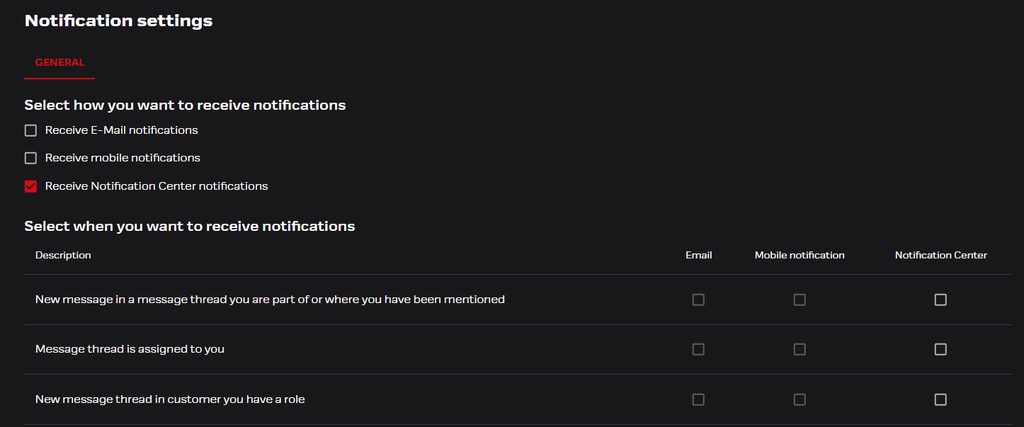
The development of the notification system continues. Users can now adjust their notification settings in a more versatile way than before.
First, the user selects the channel through which they wish to receive notifications. When making this selection, it is worth noting that not all notification types can be received through all channels.
Notifications can be received via:
- Mobile (push notifications)
- Notification center (the bell icon in the browser top bar)
Next, the user selects which notification types they want delivered to which channel. At this point, it is possible, for example, to direct some notification types to email and others to the notification center.
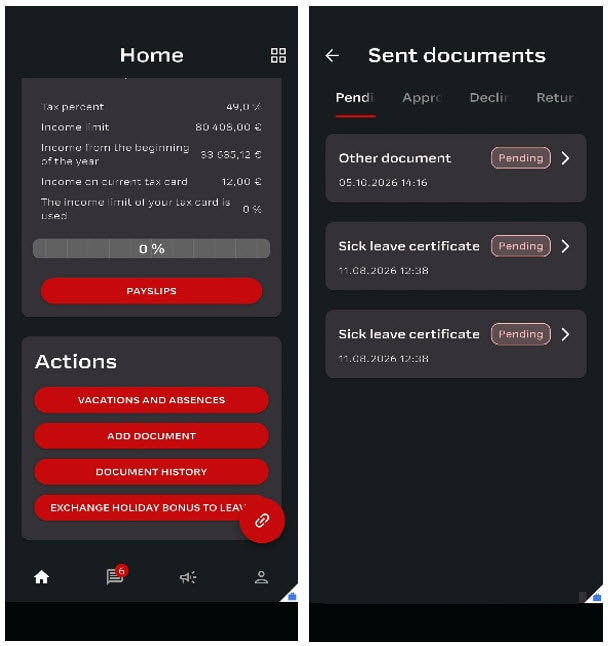
Alongside the general version update, a new mobile version is also being released. The biggest new feature is the introduction of the Documents module to mobile. This functionality is already available in the browser version.
- The “Add attachment” function is now called “Add document”
- Customer-specific documents with their own separate approval workflows are now available to open individually
- As a new feature, users can browse the Document history, where they can see all submitted events organized by status
Other elements included in the new mobile version:
- PIN-code alongside of biometric login option (User can set PIN-code per login session, to ease accessibility)
- HTML formatting for annoucements
- Announcement attachments available for download
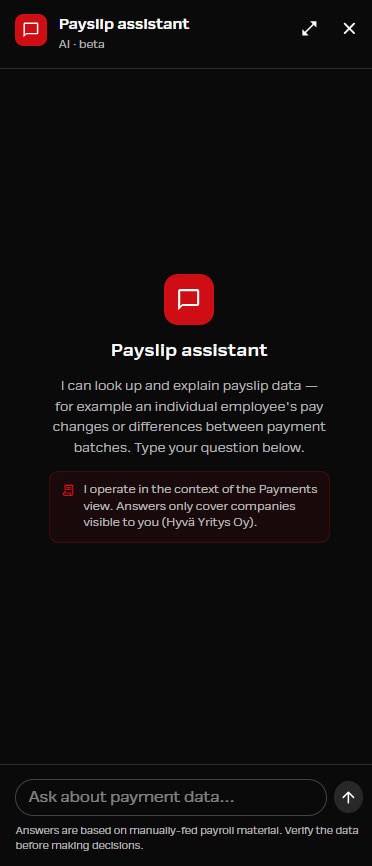
The Payslip Assistant is an AI chat service through which payment handlers can ask questions about payslip history. The search provides answers and summaries based on employee numbers. The Payslip Assistant is available in the browser version within the Payments function or inside an open message conversation.
- A beta version of the Payslip Assistant is now published as a new feature
- The current feature can be enabled for testing for a limited time period
- The add-on feature is not activated automatically
Optimizations for Absence and document approval flow, for example:
- Following the fix, events are once again manageable on behalf of supervisors, when using HR admin view in two stage approvals
- The pending approval count indicator refers to the number of items in one’s own approval queue, not the total number visible when an HR role user has selected “all.
Optimizations for Message conversation log, for example:
- Correct information regarding handler changes
2026-09
- Release date 10.9.2026
Notification center
Notifications can now be filtered by category in the notification center. The filter only shows categories for which the user currently has at least one notification and empty categories are hidden.
- Selecting a category filters the notification list to show only that type
- The active filter is visually indicated
- The user can clear the filter to return to viewing all notifications
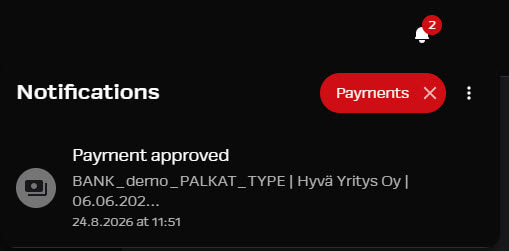
Available categories:
- Messaging
- Payments
- Payslips
- Approvals
- Payroll Material
- Payroll Report
- Errands
- Task Management
Next action parameter for Pending and Open
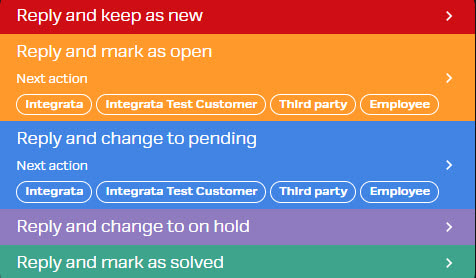
In addition to status, Message-users can now mark which party is responsible for the next action required. This has been done to make it clearer if a conversation is waiting actions from the user’s standpoint.
- Status control and additional fields can only be used by users with a role, and if the status control has been set as available. This is done when Messages are being used for internal communication in addition with Integrata’s support channel.
Integrata-user’s responsibility is to update correct status if message has been opened with Integrata’s customer service.
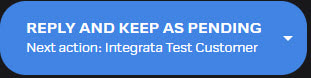
- Next action can be selected when the status is Open or Pending
- Available values are: Integrata, Customer, Third party or Employee
- Employee-option is only shown if it is relevant in the message category visibility setup
- Next action can also be left empty
- If a participant is not able to change conversation Status, it will automatically change the status to Open, for example if an employee replies to conversation
Multiple features have been given minor optimizations regarding usability and performance, for example:
- Approvals view Search-field optimization
- Two-tier approval issue, if manager sending on behalf of team member
- Mobile web app screen has gotten scaling improvements
2026-08
- Release date 20.8.2026
Tags
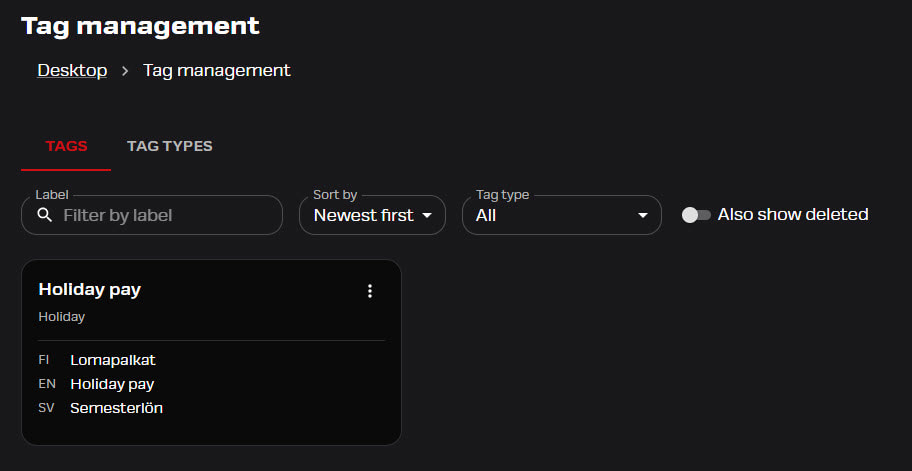
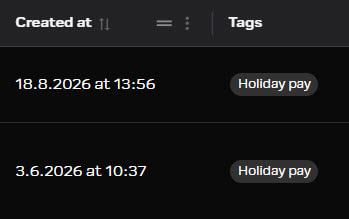
Conversation tags can now be used and opened as tag types (groups). Message list can be filtered by tags, by using one or more tags as filtering options. Used tags are also shown in a new column.
- Tags can be viewed and added to conversations by users with message handling roles
- Tag management is separately activated feature; it is not in use by default
- Tags and tag types are maintained by customer’s own HR or Admin users
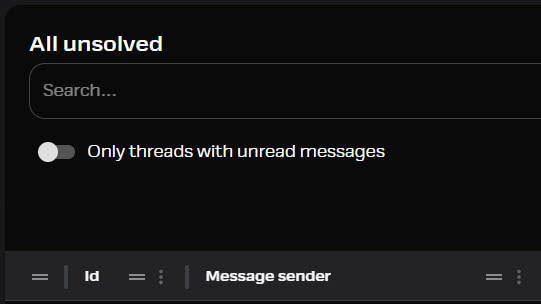
Filter unread messages
Messages now include an unread-only filter, and unread-based lists focus on conversations with unread messages.
- Filtering option is available in all list views
Text editor and attachments
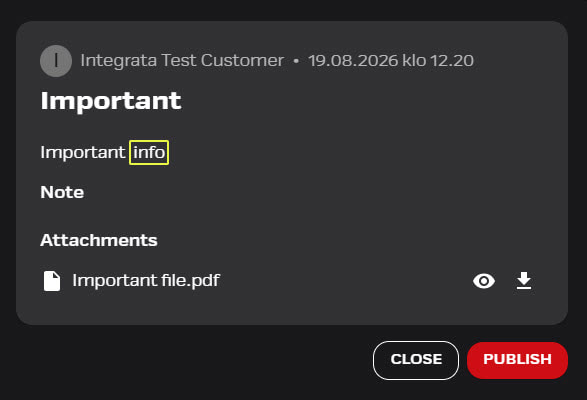
- Announcements can now use the same rich-text editor previously available in Messages
- Announcements can also include files in addition to pictures
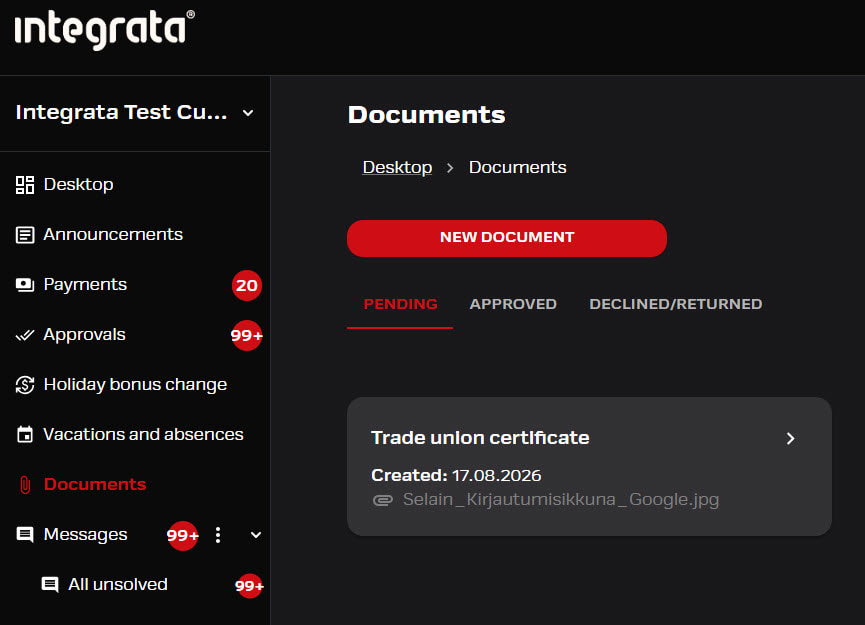
Renewal of Attachments-feature!
Old Attachments feature has been renewed and will be named in browser as Documents. Mobile updates are coming during autumn. New setting options will become available after mobile updates, but browser UI will show new option already.
Documents-naming will better guide users about the feature, and setup changes will bring more flexibility to approval flow and customer based document requirements.
Document types
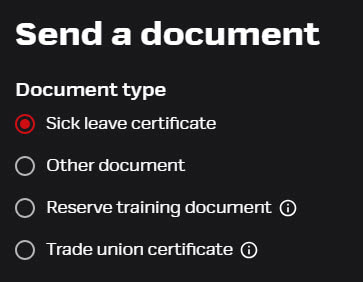
Documents now use document types instead of attachment types, with default document types (Sick leave certificate, Other, Employment document). Document types can now be configured and new document options can be added.
- Each document type can be set with separate approval flow, naming, info text and visibility
- Visibility will tell who can find this document type as an option
- Modified document types can be applied to use after mobile update
User’s document history and editing
- User can now check document history in the browser view, and can see the flow through approval status
- Documents under Pending-status can be modified and or deleted, if they are not yet approved
Sickleave certificates can also be viewed here, but since they are governed under Sickleave entries they can only be edited there.
Document approvals and notfications
- Browser’s Approvals -feature will now show term documents instead of attachments
- Sick leave certificates are shown under filter absence, since they require absence period for filenaming
- Customized document names will show in the approvals listing and approval screen
- Notification will follow the ne terminology
UI adjustments to vacation view
Vacation feature’s UI has been further developed. Feature was previously shown as Absences, and naming will now depend on applied features.
- If both sick leave and vacations are enabled, menu shows “Vacations and absences“.
- If only sick leave is enabled, menu shows “Sick leaves” (as it was before).
Integrations related to vacations are still in development.
- Multiple features have been given minor optimizations regarding usability and performance
- In the mobile app, the biometric sign-in prompt is now shown only the first time on a device instead of appearing again after the user has already dismissed it
- Mobile login now shows more specific error messages when user details cannot be resolved, instead of a generic failure message
Payslip history -feature
Payslip history -feature used by Reviewers is no longer available in the Payments view as both the history tab and expandable option inside Payment reviews. This was done to optimize performance, and for the moment will not be available.
2026-06
- Release date 11.6.2026
Fixed HR permissions
Before most of the features were governed by HR role. Now these coded role permissions can be modified more extensively. Earlier release included the Announcement-feature’s publishing role.
- This version update releases the holiday bonus exchange form’s admin to selected role
- This will add more flexibility to the feature
- If HR is not the proper user role, it can now be modified by request
Notification center
Now available in the notification center are notification types:
- Approval events for manager (absence + holiday bonus exchange + attachments)
- Employee’s notification upon event in approval flow, f.e. decline of absence
- New delivered file through payroll or bookkeeping reports
- Delivered file notifications can also be modified per user with new setting: New report has been uploaded
- Users can navigate to the event from the notification in the notification center.
New Vacation feature has been added as a separately configurable addition.
- If activated, user will be able see the option to add New vacation under Vacations and absences
- At the moment this feature is only available in the web user interface
- Request form will also show available holidays, if they are brought to Platform from another system
- Feature is still under development regarding integrations, and it can be activated after integrations are ready
- Vacations cannot be requested on behalf of team members
- Approval flow follows the same chosen logic as absences and attachments
New feature added to Messages: Tags
- Feature can be opened per customer, and chosen tags can be maintained by customer’s own HR or Admin users
- Users with a role can add and see tags on conversation
- Tags-field can be accessed from the top bar of an existing conversation
- Integrata’s user can also use customers’ own tags if needed, but Customer tags are mainly meant for the use of the customer themselves
- Tagging features are still in development and next release will include message list sorting based on tags and grouping of tags
Read access to delivered payroll materials
- It is now possible to give a user permission to see all payroll materials delivered, not just their own
- Reading permissions can be given to named users according to separate requests
Manager’s permission
- File delivery can also be included to managers as default, so that all managers can deliver payroll files based on their manager role, instead of individually added access
- Managers do not have this configured by default
Payment flow events
- Payment events are directed to Payroll team or other defined role
- For payment messages that do not require action, a notification will only be sent to the notification center in the browser view for the assigned role
- Error messages or events such as a rejected payment will still open a new message thread for the assigned role
Scaling to screen sizes
- Messages and notification center scaling to smaller screen sizes have been optimized
- Some improvements have also been added to Payroll delivery
Mobile
- Mobile app versio will be updated in approximately the same schedule
- Version schedule might differ depending on users OS
- Two tier approval: Two tier approval flow can now be done in mobile. Earlier only managers were able to approve in mobile, but this has been made available for HR as well
- Message receiver list scrolling: Receiver list can now be scrolled, if it includes multiple lines
- Payslips when reviewing: Payslip viewing inside payment patch has been fixed
2026-05
- Release date 12.5.2026
Text editor additions
Features using text field editor will now support links, H1–H3 headings, and list indenting, and preserves this rich-text formatting when messages are saved and viewed. Rich text editor also supports adding colored text borders plus undo/redo buttons and keyboard shortcuts.
Notification center: Approval events
Events requiring manager approvals (f.e Holiday bonus change requests) can now appear in the notification center. Also possible return actions will appear in the notification center for the employees themselves.
Admins can now configure whether “Also send to manager’s substitutes” is preselected by default when employees message their managers. The default may now appear on or off based on the customer setting; employees can still change it per message.
Message attachment limit warning
Message composer now warns when email recipients are included and attachments exceed the 10 MB limit. Users may see a new warning while adding files; reduce attachment size/count to avoid email send failures.
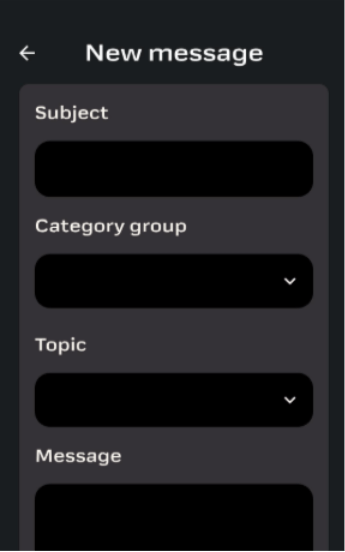
New Message now supports selecting a message category group to filter the category list (when groups are configured). If no groups exist, the screen stays the same; changing/clearing a group resets any chosen category and nothing is auto-selected.
Payroll and Accounting Reports views now accept multiple files downloaded at the same time. This will result in downloads being formed into zip-files, allowing multiple reports to be delivered in one package. Payroll material delivery will still reject .zip files; oversized .zip uploads are blocked by the usual file-size validation.
Payroll and Accounting report -view can now be used to deliver .xml-files and include them in report history for download. Applies only to outgoing reports; incoming payroll materials still don’t accept .xml (oversized files show the standard size error).
Payroll material upload now auto-selects the Payment group when your company has exactly one active payment group. The field stays editable if there are 0 or 2+ groups it remains blank and must be chosen manually.
Payroll materials delivery can now use additional information fields with files:
- Employee number
- Comment
Employee number -field can be activated per customer. If it is used, the system will auto-fill the employee number when the filename contains a valid 1–10 digit number. Uses the first valid number in the filename; can be edited and is cleared if “Multiple” is toggled on. Employee number setting is off by default.
Payroll material submissions can also include an optional free-text comment (up to 280 characters), enabled per customer. Admins can toggle “Allow file comments”. When enabled, file deliverers can add/view comments on submitted materials and payroll can view them read-only.
Role-based access is now configurable: announcement publishing (and other previously fixed HR capabilities) can be granted via role permissions. Previously announcement publishing was only available for HR role users.
Payments page
Clearing the search box now resets the payment list automatically. Users who delete the search text will see the full list again without needing extra clicks.
Message navigation
Messages page now remembers your selected view and left menu expanded/collapsed state after a refreshing browser. Refreshing no longer resets the Messages view or drops filters.
Navigation from notification center to message thread has been optimized.
2026-04
- Release date 14.4.2026
Google login
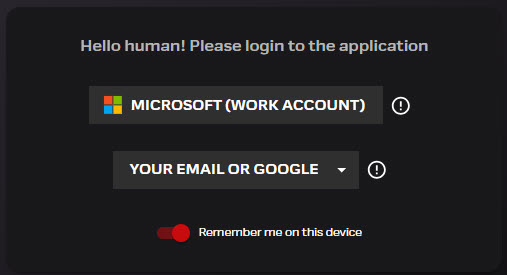
- Alternative customer login method is now available with Google identity
- Integrata Admin will open settings per customer
- “Login with Google” will now be shown on the Login screen
Login method will become available to mobile with next mobile update.
Customer specific roles
- Customers’ own roles can now be filtered by Admin users in the Personnel view
- System roles (f.e. HR) are separated to own sorting menu
- Customer role examples are Payroll material deliverer or other feature-based user access role
- User roles -view has been simplified to show only users’ own roles as default
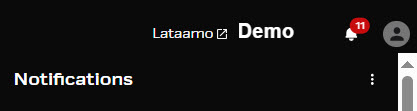
Notification center is the latest new addition to web UI. New bell icon can be accessed from the top bar, and it will include all latest notifications related to Messages and Payments. You will receive the same notifications that could have been sent to your email:
- You can move directly to the event in question by clicking the notification
- List will include the latest 10 events, and you can choose to see more with the Load More -option
- Notifications are written according to chosen language setting, and language will not change to old events if changed
- Unread events will be shown with red number indicator
- You can mark all notifications as read from the Notifications menu
- New notifications are updated automatically every 5 minutes
Notification center will receive further updates in the coming releases, and in the future, it will include more features in addition to Messages and Payments.
UI enhancements
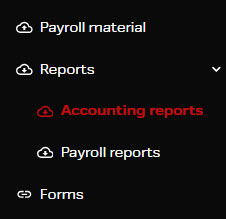
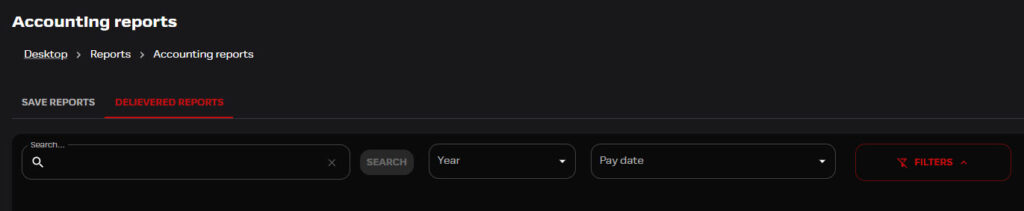
Payroll Materials and Reporting are now separate sections in the left navigation with clear icons, so that users can easily understand where to upload incoming files and where to access delivered reports without confusion.
- Payroll Materials appears as a top-level navigation item with an upload icon
- Reporting appears as a top-level item with a download icon
- Reporting includes two sub-items: Payroll Reports and Accounting
Filtering enhancements
Materials and reports can be filtered not only by date range but also by selecting a specific year and the payment dates within that year, so that you can quickly locate the exact materials or reports associated with a payroll cycle without manually adjusting date ranges.
- Select a Year from a dropdown
- After selecting a year, dynamically view and select Payment Dates that exist within that year
- Other filters can be expanded or collapsed to keep the search interface clean and focused by default
- Same filtering functionality can be used consistently across each history view
- User can use multiselecting when filtering, and file selection can also be sorted per column
Absences and attachments
- Two-phased approval has been optimized and can now be applied to all attachment types
Messages
- If implemented, category groupings used in sorting have been optimized and more user friendly
Payments
- Automatic payment notfications logic has been optimized
- Payment list sorting can now be done with multiselect
Announcements
- Annoucement targeting will no longer show values saved from deactivated users
2026-03
- Release date 12.3.2026
Possibility to group message categories in two levels. This feature is available in web interface.
- When opening a new conversation, user will first choose the correct group level, under which will list available sub-categories
- This configuration option will help to improve usability with longer category listing

- If even one category has been added a group level, this will show up as two drop-down menus in the user interface, when opening a new conversation
- If any categories are not set under specific group, these will show up under group option Other
- If no group levels are configured, the user interface will show just one category menu option as a default
- Category sorting options will list categories under group, and the whole category group can be sorted at once
More filtering options available in Payments list view:
- Company – If payments are processed with differing approval flows per payment group, this menu will list payment groups as companies
- Payment type – Payroll / Other
- Approval method – Manual vs Automatic

In addition, the Company column is now separate with filename modifier (see picture “PALKAT_TYPE”). This filename modifier will give more information of the type of payment and payment group in question.

Currency support
- EUR and SEK currency can now be processed through Service Platform. Correct currency € or kr can be found from payment related details.
Message event log
- The event log under conversation will now be shown as minimized if it contains more than two instances.
2026-02
- Relase date 12.2.2026
Optional settings for approval flow
Absences and attachment approval flow has now options in addition to previously available manager or automatic approval flow. Approval can now be through HR role or two-phased: from manager to HR.
- In two-phased procedure HR will receive notification after managers have approved absence
- Once the HR has checked absence or attachment, the employee will be notified
- If own manager is also HR, the approval is only done once.
- New pending status “Waiting for HR’s approval” can be viewed in the Approvals view
- If only HR approvals is configured, managers will not see Approvals-menu

Get to know the new available feature from here.
Payslip history
Employees’ payslip history can now easily be accessed when reviewing payments and as a history archive.
- History will be shown to users depending on their Reviewer and Approver visibility rights

- When reviewing a payment, the Reviewer can list users’ payslip history under the current payment
- If the employee has history from a separate payment group, it will not be shown under the current payment

Unread internal comments
- New unread internal comments under a conversation will now show up with an unread indicator
Spaces with IBAn numbers
- If a user has been able to update personal banking info (IBAN), unnecessary spaces might have been saved to account number
- In the future spaces are removed automatically in the integration
Messages loading delays
- Loading delays of the message list view and when opening a conversation has been reduced
Messages attachment previews
- Message attachment previews have been optimized
- Pdf-files will show up normally in the preview window, and any error messages related has been localized and modified to be more descriptive
2026-01
- Release date 15.1.2026
MFA with email registration: 2.2.2026
In the effort to make the application more secure, we are implementing Multi-factor Authentication (MFA) for email-based sign-in. This will come into effect from 2nd of Feb 2026.
- Login will continue to work as before using an email address and password
- In addition, users will be asked to verify their sign-in with a verification code sent to their email address during the login process
- The code is entered on the login screen, after which access to the service is granted as usual
- MFA enhances sign-in security by verifying the user’s identity using two separate authentication factors. This helps reduce the risk of misuse and provides improved protection for user data.
Applied SSO-login options and any MFA settings set in own IT environment will not be changing.
Admin-tools
- Admin users can now check team members under a selected manager in the Personnel feature

- Mobile updates run alongside the general version update, but release schedule might differ slightly and depends on mobile operating system (Android or iOs)
Digital Employee Card
- This new element will be available as a basic feature in the mobile application, and it can be accessed by all mobile users
- Digital Employee card can be found under personal information from the Card menu
- If the company logo has been configured, it can be shown on the card
- Following information will be shown: Company logo, Profile picture, Name, Work title

Elements previously available only in web application are now added to mobile:
- Absences and attachments: Timestamp of approval
- Absences and attachments: HR approval options
- Company link page
- Messages: Deleting messages
- Messages: Tagging users
- Messages: Sending to manager’s substitute
Other new elements:
- Holiday bonus exchange: Exchange request handling status visibility
- Messages: Employees can view conversation participants


New Change Form
- Users can see the status of processing once a change request has been submitted
- Status is shown either Pending, Declined or Approved
- Web UI will not let the user submit again with the same value, and user must actively choose to apply change to their request if they wish to modify it
- In the mobile, status information is shown in the top part of the change form


Under one day absences
- Under one day absence feature can now be hidden if not needed
- This has been used to announce hours in case of one day absences
- If absences are not reported from the platform, this step can be skipped
Mandatory attachments
- Attachments can now be made mandatory per absence type
- Absence cannot be marked without at least one attachment while this setting is in use
- If attachment is mandatory the user will not be able to activate option “I don’t have an attachment yet”
Sending attachments on behalf of team members
- Manager can now send attachments on behalf of team members even if an approval flow has not been configured
Follow-up question for Integrata® AI
- AI-features users can ask a follow-up questions without adding to the open conversation
- Question or the AI reply suggestion will be show for other configured AI-users, but it will not show on the PDF-print of the conversation

Employees can now view conversation participants
- Employee users will now have visibility to conversation participants
- User can see a list of names, who have access to the conversation
- If message was received by Integrata, only the role name will show, f.e Payroll
- In the mobile application, the visibility can checked inside the conversation under Thread visibility
- In the web UI the employee can see a full list of participants when opening a new conversation. Same field can be viewed from inside the conversation.
- Employees cannot modify participants. Employees can only decide whether to send message to manager’s substitutes or not, if the default receivers include own manager.


Message list view optimizations
Last update included a more customizable message list view, with modifiable columns. These updates have now been enhanced and to improve visual usability all sorting options are now hidden by default. Options can be accessed with the Filters-button.
Other changes and additions:
- Re-arranged option settings
- Column resizing will now be saved if changing view
- Hide-options are added to column menus (three dots)
- Show all columns option in the same menu
- Improvements to scaling
- Conversation can now be opened to separate tab

- Payment reviewer will be able to search users with employee ID
- Reviewers can sort Payslips with employee names listed in order: last name – first name
Old application name visible in notification
Old application name has now been removed from “You have a new Payslip” -notfication.
This has been replaced with new names:
- EN: Integrata Service Platform
- FI: Integrata®
- SE: Integrata®
Payslip review report issue
- The csv-report which can be downloaded to review payslip sums, has not imported all sums
- File forming has been checked to produce a more usable report
2025-12
- Release date 11.12.2025
Customer specific roles were released during October, and these can now be updated via user import integration. Different features can be set to be used per user group with customer-based roles.
- Admin-user can now search with Employee number from Personnel-menu.
Payment filename to Overview
- Previously the file name was partially shown in the payment listing, and it is now fully shown in the payment’s Overview-page
- This will bring more information for the reviewers, for example if the payment was related to travel bills or a specific payment group

Update to Transactions-view
- The Overview screen has been removed from the Transactions and Payslips -menus
- This will bring more room and usability to the views
- Review and approval options can now be found from the top right

Payslip sorting and report
- Payslips view can now be sorted as needed, per chosen column
- A compilation of the current payment can also be downloaded with the Download csv -option

Message listings have now a new header line to give users more customizing options. Also, the scaling for different screen sizes has been improved.
Users can now:
- Move column order
- Resize column width
- Resize line height
- Change to full-screen view
“Mark the messages in the view as read” -option is now more visible above the message list.
- A new column Message ID has been added.

Multiple attachments
- Users can now add multiple attachments to messages at the same time
- Absences or delivered attachments now have a time stamp added, once the event has been processed
- This can be viewed in the Approvals screen and by employees themselves
Visibility of old payslips
- During October, some users experienced a 404 validation-error when trying to view old payslips
- This error is now fixed, and archive can be viewed as per normal
Message attachment’s preview
- Message attachment preview -window has given users message “Failed to download attachment”
- Previews should now be working normally
Mobile 2025-12
During the summer and autumn, we have updated the name of the Integrata® Service Platform and phased out the old HumHum HR system name. Behind the scenes, we have also been developing a new mobile application platform. Once released, the app will likewise appear in app stores under the new Integrata Service Platform name.
- The updated mobile app will be released in stages
- The rollout will begin on Monday, 8 December 2025, and the new app will first become available for iOS devices
- This means that not all users will receive the update at the same time; instead, the update will be delivered in batches over several days
- The renewed mobile app will replace the previous version, so no action is required from users regarding, for example, app permissions

- Announcements can be shown on the front page, depending on the announcement-settings
- The latest important announcement will show up first.
- Payslip information listed on the front page can be hidden away from view
- More details can be toggled with Hide-option (eye-icon)
- When first time login into the application the hide-option is activated by default, but application will remember your preferred setting
- A visual income limit meter is a new addition to front page
- Meter will visualize an estimate of progress during the year
- A possible income limit alert will be shown under the meter
- Settings-page has been renamed and includes visual enhancements. (Previously named: More)
- The language setting will by default follow user´s phone settings (Finnish, English, Swedish), but it can be modified
- Settings-page will also have options for Analytics and User info, and for managers the substitute setting
- Analytics will help identify any login issues or error situations


- Payslips will now have capability to show inserted message field if such was included in payroll
- This was previously available in web browser application only
- On top of visual improvements, the Payments feature will now include comments logged by the reviewers or approvers
- Separate view options for status-based listing: Pending, Approved and Rejected
- Payments will include same pre-review information as the browser view, for example: new employment or changes in salary


Following features were previously available only in web application, but they have now been added to mobile:
- If you insert a duplicate absence period, user will receive an error message alerting of an existing date
- A pending absence can be modified and or rejected by the user themselves
- Reason for decline is now visible in the event
- Sending absence and related attachments is now done in one action

All events can now be processed in the same view. Following manager features can now be accessed through mobile app:
- Approvals-view will list all events waiting for managers’ approval: holiday bonus exchange, attachments and absences
- Filtering options: status, team member, substituted manager and event type. Chosen filtering will remain until changed.
- Managers can modify absences
- Separation between own team and substituted ones.
- Approvals won’t show substitutions until filtered accordingly
- Substitute settings can now be modified under Settings
- Manager can send absences / attachments on behalf of team members


- Push-notifications can now direct user to the correct feature in mobile application
- Any announcements that include a calendar event or reminders can be directly imported to own calendar.
- Users can choose to hide fields related to nearest of kin information
- Message senders profile picture can now be viewed in conversations
2025-11
- Release date 13.11.2025
Email login logic change
If the chosen login method is email registration, each allowed email domain needed to be listed. This can still be set, but all domains can now be allowed at once.
- The latter option is suitable for situations where company users do not have company emails, and personal email addresses are used as usernames.
New status option: On hold
- Customer service will be using a new conversation status handling option: On hold
- New status can be used when the processing of the conversation is not active at the moment, or it is waiting for a third-party input.

Customer service role management has been simplified
- User with a message handling role can now add additional roles to a conversation, from a list of roles that are related to necessary services and / or systems.

Several usability enhancements has been added for example menu-options are shown in alphabetized order and language modifications has been added different components.
Payment approval message twice
When multiple Approver stage requirements were set, an automatic payment approved message was sent after each approval.
- Now only one message is activated after the final approval has been made.
2025-10
- Released 9.10.2025
HumHum HR –system name will be changed to Integrata® Service Platform. Change will be made through stages:
- HumHum-naming is removed from emails and notifications
- Notifications have a new sender info: Integrata and noreply@integrata.fi
General notification language setting
- Notifications can be set for chosen language (english, finnish or swedish)
- If the notification receiver can be identified as a username, the individual language setting is followed instead of the general setting
Customer specific roles
Customer specific roles can now be defined and configured and these roles can be given access to required functionalities.
- This works in situations when a certain feature is used by only a particular usergroup or company
- Roles are configured by Integrata, but the Admin-user can give specific roles to needed personnel
Personal message templates
New reusable message templates can make routine messaging quicker and more unified. Users can save reusable templates as needed.
- Enter text into the message field and save it as a template
- Give the template a name
- You can save multiple templates, and they can be modified or deleted
- Pictures cannot be added to templates
- Multiple templates can be added to one message
- Templates are user specific


Payslip translation update
- Payslip translations are now updated to include all headers
- All information is shown with the payslip language set in Mepco
- Individual language setting on the platform does not change the language option that is coming through from payroll
- I’m participating -sorted message view did not show unread number indicators on the left-hand side panel. Indicator has been fixed, and behaves as with other sorted views.

Did not find what you were looking for?
You didn’t find solution from our knowledge bank? You can send a message to our customer service or get in touch with our specialists.