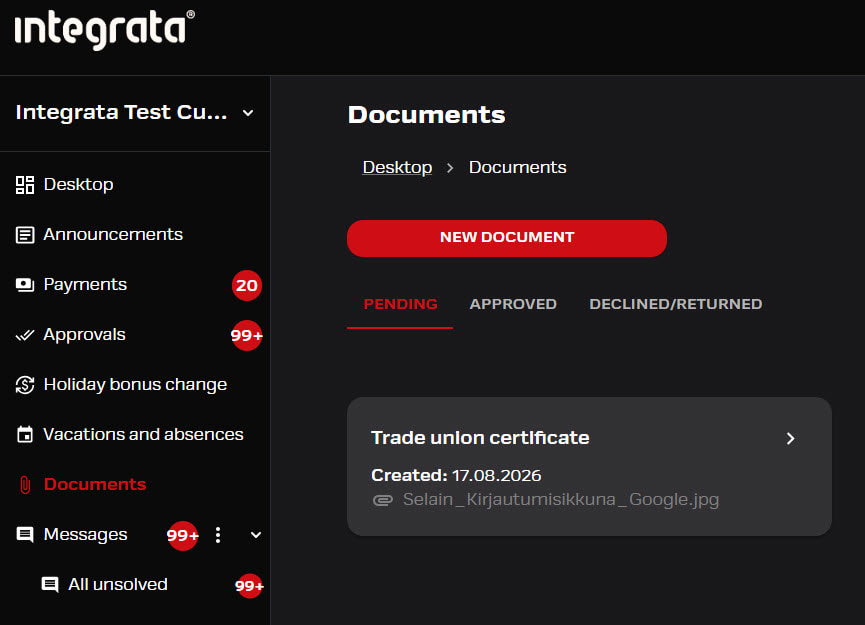
Documents
New document
Employee can safely deliver needed document through Integrata-app. If the documenttype has an approval flow, the approver will automatically receive notification of new events.
Depending of the configured features employee can:
- Deliver sick leave certificate
- Deliver other specified documentation needed in payroll
- Edit documents in pending-status
- See own event history
If approval flow has been implemented, the manager can also deliver documents on behalf of own or substituted manager’s team members. This is done in the feature as when sending their own document, but manager can choose the document owner name from their list.
- Sick leave certificate must always have information of the absence period dates, which will form the file name during delivery
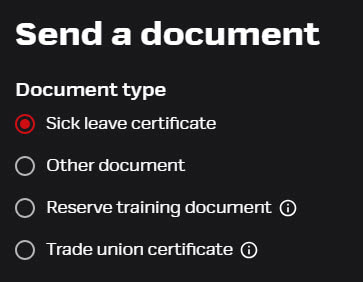
Send a new document
You can find Documents-feature from the mobile app’s front page (New attachment) or from the browser feture listing.
- Choose form the opening selection the correct document type
- If you select Sick leave certificate, add details regarding the absence period and choose the appropriate absence reason
- Take a picture or download it form your computer
- Press Send
According to your own settings, you will receive a notification if your document was not approved. If the document type does not have approval flow, the app will automatically mark the document as approved.
Read more about approval flow here.
History and editing
Users can check their event history in the browser interface. Progress status will also be shown here.
- Documents in the Pending-status can still be modified or deleted
- You can also view sick leave certificates here, but since they are attached to absences, any editing must be done under Sick leaves -feature
- Note approved documents can only be viewed for 30 days