Messages
Message notifications
The user has the right to adjust how they want to receive notifications from the Integrata® Service Platform. Notifications can be received via email or through the mobile application.
You can choose from your own settings in which situations you receive automatic messages from the Messages function:
- Select Notification Settings from the top right corner of the browser under your profile icon. The notification settings for the mobile application are located in the app’s settings menu.
- In the mobile application, you can only choose the delivery method for notifications, and more detailed message notification settings can be found in the browser.
- The number of selectable notification settings depends on your user role
The selection of incoming notifications may be necessary, especially in situations where the same role includes multiple users who do not all actively handle current matters.
Notification settings for messages
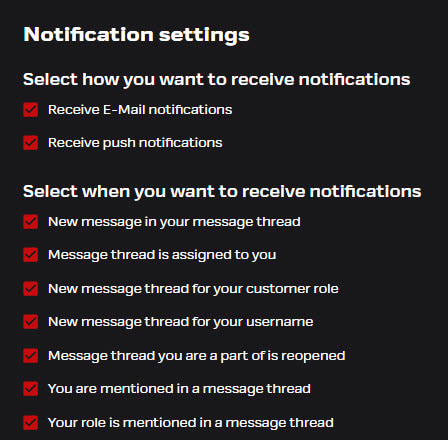
Select the situations in which you’d like to receive notifications in the “Messages” function. Users with processor roles will see a wider list of options, while employees will have a more limited selection.
- New message in a a message thread you are part of or where you have been mentioned – A new message in an existing thread where you’ve sent a message, are a assignee or you have been tagged
- Message thread is assigned to you – You’ve been assigned as the responsibility for the conversation
- New message thread for your customer role – A new message thread you can see through your role, or an existing thread to which your role has been added.
- New message thread for your username – A new message thread you’ve been directly added to as a user. Others with the same role may not be able to see the conversation.
- A message thread you are part of or where you have been mentioned has been reopened – The roles that were involved in the thread will receive a notification if the old conversation is reopened
- You have been mentioned or marked as a participant in a message thread – Your name has been tagged in a message.
- Your role is mentioned in a message thread – Your role has been tagged in a message.