Messages
Message status control
Message status control is partially automated but also maintained by the message handlers. From this page you take a deep dive to Messages status control details.
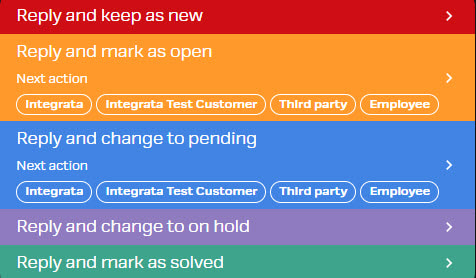
The processing status of a conversation is managed with five different status options, which the Handler sets according to the situation. You can select multiple statuses at once in the filtered message list view. To indicate who is the next responsible party and whose response is the conversation waiting for, the handler can also mark Next action -value.
Integrata’s Customer service will be responsible for status control, and changing status is not possible in these cases. Status handling can be granted if system is also used for internal conversations.
- Statushandling can be done by users with default system roles or this permission can be given to managers
- Employee cannot change handling status. When employee answers to conversation the status is automatically chnaged to Open.
Status
- New: All newly started conversations are always in this status.
- Open: The conversation progress is still ongoing or waiting for processing. Employee has answered to conversation.
- Pending: Conversation is waiting for a reply or action
- On hold: Conversation is onhold when it is waiting for a future schedule or pending at a third party for a longer period
- Solved: The matter is considered answered or resolved
Next action -info can be selected with statuses Open and Pending. This will indicate who is responsible for the next action or whose response is required.
Next action
Next action -information is additional value shown with Status. This will indicate who is the next responsible party and whose response is the conversation waiting for.
Available values are:
- Integrata = customer service is processing conversation or it waits for their responce
- Customer = Customer’s handlers are responsible for the next action
- Third party = The conversation is waiting a response from a third party
- Employee = Employee’s answer is next required action
- No next action = information has not been marked, or employee has answered
When an employee, who cannot modify status, contonues existing conversation, the staus is automatically transferred to Open + No next action.
If a handler wishes to sort their own message list view, based on conversations waiting actions from handlers, they can filter bu using Next action -values “No next action” and “Customer”.
Solved messages
When a message thread is marked as Solved, its processing is complete at that point. Start a new message for a new topic.
- If necessary, you can still add to an existing conversation by sending message into it. The conversation status will then update to Open.
- After 30 days the conversation will appear as Closed, and cannot be continued
- Closed conversations cannot be modified except regarding fields Visibility and Retention period.
- Resolved conversations remain in the views by default for four years.
- You can find solved conversations under the predefined view filters (All Messages or All Resolved).
Feedback questionnaire
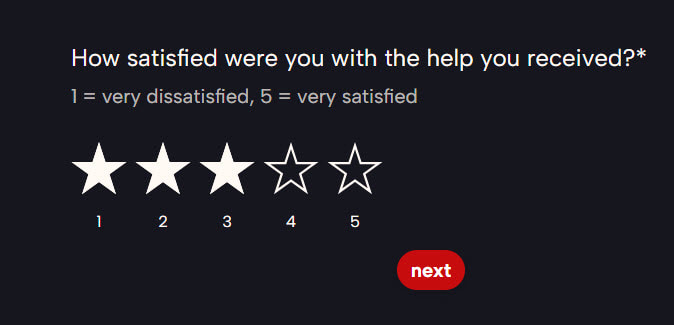
When Integrata’s customer service has solved the conversation, the conversation view will automatically show a feedback questionnaire to the bottom part of the conversation. Language is depending of your own browser settings.
- The questionnaire will request feedback with values 1-5, and you can give a text feedback after pressing next
- A link to the questionnaire will also be sent to any email recipients with the latest message from a solved conversation
- Giving feedback is not mandatory
- The feedback screen will be visible at the bottom of a solved conversation, but you can scroll past it