General
Notifications
The various functions of the Integrata® Service Platform send automatic mobile app notifications or emails. For instance, payment approvers receive information about new payment instalments to be processed, while managers receive reminders about absence requests that are awaiting approval.
Users can choose their preferred notification method. Notifications can be delivered to their phone as push notifications or sent to them by email.
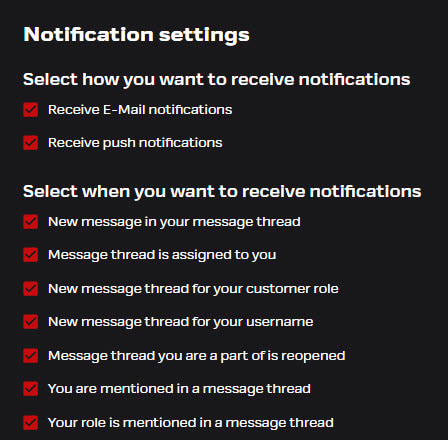
- In the browser app, select “Notification settings” under your profile. In the browser, you can also adjust feature specific settings
- In the mobile app, select the app’s settings menu
Language and sender
- Email notifications will arrive from address noreply@integrata.fi
- Notifications can be set per customer for chosen language (english, finnish or swedish)
- If the notification receiver can be identified as a username, the individual language setting is followed instead of the general setting
Notification center
Notification center can be accessed in the web UI. Bell icon is located in the top bar, and it will include all latest notifications for applied features. You will receive the same notifications that could have been sent to your email.
- You can move directly to the event in question by clicking the notification
- List will include the latest 10 events, and you can choose to see more with the Load More -option
- Notifications are written according to chosen language setting, and language will not change to old events if changed
- Unread events will be shown with red number indicator
- You can mark all notifications as read from the Notifications menu
- New notifications are updated automatically every 5 minutes
- You can also filter notifications by category type
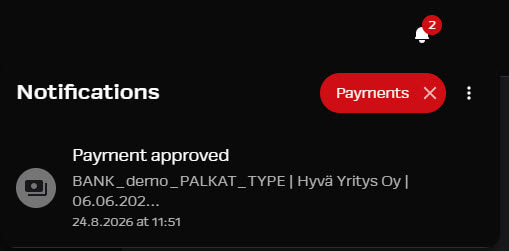
Available categories:
- Messaging
- Payments
- Payslips
- Approvals
- Payroll Material
- Payroll Report
- Errands
- Task Management
Check feature specific notification logic from below.
Notification settings for messages
Select the situations in which you’d like to receive notifications in the “Messages” function. Users with processor roles will see a wider list of options, while employees will have a more limited selection.
- New message in a a message thread you are part of or where you have been mentioned – A new message in an existing thread where you’ve sent a message, are a assignee or you have been tagged
- Message thread is assigned to you – You’ve been assigned as the responsibility for the conversation
- New message thread for your customer role – A new message thread you can see through your role, or an existing thread to which your role has been added.
- New message thread for your username – A new message thread you’ve been directly added to as a user. Others with the same role may not be able to see the conversation.
- A message thread you are part of or where you have been mentioned has been reopened – The roles that were involved in the thread will receive a notification if the old conversation is reopened
- You have been mentioned or marked as a participant in a message thread – Your name has been tagged in a message.
- Your role is mentioned in a message thread – Your role has been tagged in a message.
Payment notifications
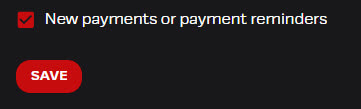
Payment reviewers will receive an email notification about a new payment to be reviewed as soon as it is created. If a payment processor has enabled the mobile app and allowed push notifications, the notification will also be sent to their phone. You can adjust your notification settings the browser application if you prefer not to receive notifications on both your phone and email. If necessary, the users can turn off payment notifications, especially if they are acting only as a substitute in the role and do not generally need these notifications.
- Approvers will be notified of a payment once reviewers have signed off on their checks.
- If there are no reviewers, the approvers will be notified of the new payment.
- When approving the payment, the reviewer can also decide whether or not the approver will receive a notification. This option is particularly useful when several instalments are reviewed and approved within a short timeframe.
- If the payment date is approaching, reminder messages are sent to both reviewers and approvers.
Automatic approval message
After the final approval, an automatic notification of the payment approval can be sent, for example, to the email address of the finance department. The message contains the following information:
- Company name
- Payment amount
- Payment date
- Number of transactions
- Payment file name
The message is delivered per customer instalment and cannot be adjusted to be company-specific. Message’s language option can be set per customer, but if a username is recognized, then the user’s own language setting is used.
Payslip notifications
When a user receives a new payslip, they will receive an automatic notification. Depending on the user’s notification settings, the notification will be sent either through the app as a push notification or via email.
If applicable, the same message will also include an income limit alert identified by the app’s automation.
Income limit alert
The income limit alert sent to the user takes into account the length of the pay period, earnings subject to withholding tax, earnings for the current pay period, the income limit specified on the tax card, and, based on these, the number of corresponding periods after which the income limit would be exceeded. If it appears that the income limit may be exceeded, a note will be included in the notification for the new payslip.
- Income limit alerts are sent from August onwards
- No alerts are sent in December, as the tax year is nearing its end.
- Alerts are disabled during the early months of the year.
Sick leave and attachment notifications
New absences to be processed are always notified to the manager and substitute via push notification and email.
- Managers and their substitutes will receive a reminder message about unapproved sick leave notifications or attachments if any such items have been pending approval for more than 7 days. After that, the reminder will be sent once a week.
- If two-phased approval flow is active, HR will receive notification after manager’s approval
- Employees will be notified if a transaction is rejected or approved
- Employees will also receive daily reminders starting three days after submission if the absence is still pending approval and the required attachment is missing
Payroll report notifications
If a user has visibility to any delivered files, they will receive notfication when a new file has been delivered.
- These notfications can be deactivated from the Notfication settings with settings: New report has been uploaded